AnyTaFont2UTF8
AnyTaFont2UTF8 Plugin for Notepad++ 
Any Tamil Font text content to UTF Encoding
1. Change Log
| # | Date | Description | Developer |
|---|---|---|---|
| 1 | 2024Apr14 | Initial release Aishwarya - Webulagam fonts conversion completed | Pitchaimuthu.M |
2. Fonts Collection
https://github.com/ThaniThamizhAkarathiKalanjiyam/tam_ilakiyam/tree/master/Collections/Fonts
3. Direct Download Notepad++ with AnyTaFont2UTF8
-
You can download directly from https://codeload.github.com/ThaniThamizhAkarathiKalanjiyam/AnyTaFont2UTF8/zip/refs/heads/master
-
Extract the downloaded zip file
-
Then if you on 32 bit Windows run / click npp.8.6.5.portable » notepad++.exe
-
Else if you on 64 bit windows run / click npp.8.6.5.portable.x64 » notepad++.exe
-
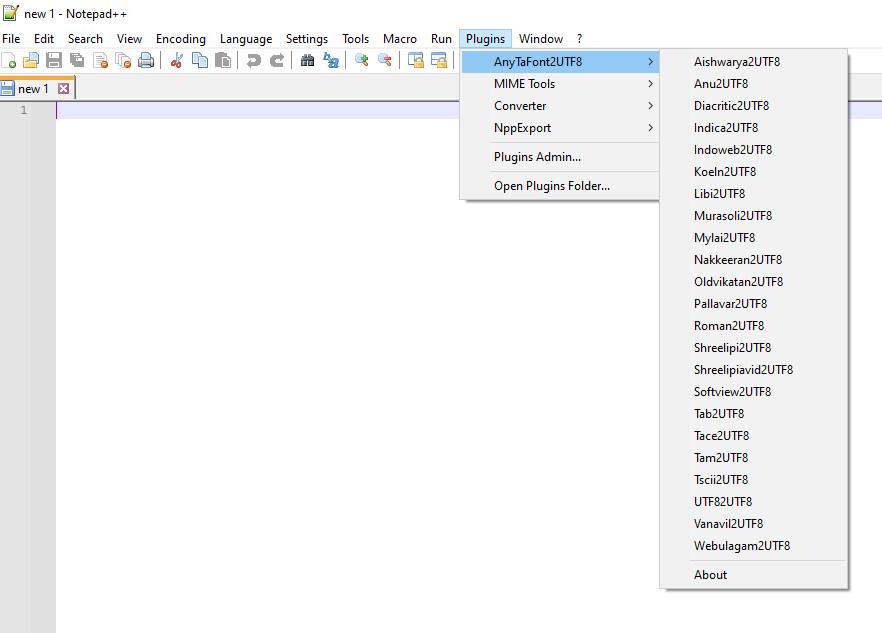
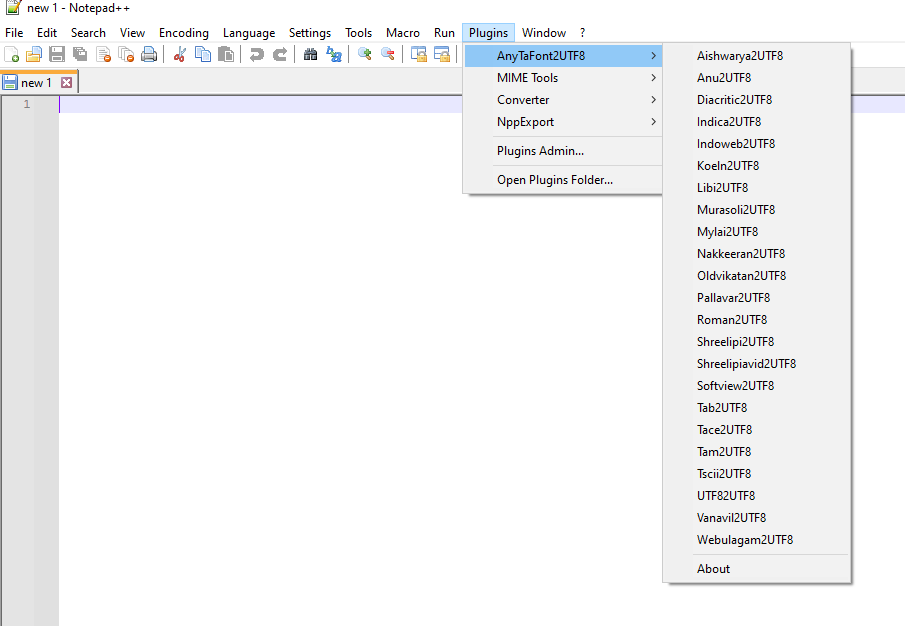
You can have AnyTaFont2UTF8 plugin at Plugins menu as below; Enjoy the Tamil Font conversion tool.
-
For tamil font users above information is enough on installation; If you try to install the plugin manually Go ahead read remaining document.
4. TODO List
- (1) RTF கோப்புகளை மாற்றுதல்
- (2) இந்த மாற்றியில் இடும் கோப்பின் அளவின் எல்லை இப்போது என்ன ? Unlimited File Size
- (3) இதன் பிறண்ட நிலை அதாவது யூனிகோடிலிருந்து மற்றவைகளுக்கு மாற்றுபவை.
5. Run the application & Installation
- If you are running Notepad++ 7.6 or later:
- You are encouraged to use Plugins Admin for installation.
- For manual installation instructions, read: Install plugin manually
- If you are running Notepad++ version prior to 7.6:
Download and extract the archive from below and moveAnyTaFont2UTF8.NPP.dllinto Notepad++pluginfolder.- For Notepad++ x86:
C:\Program Files (x86)\Notepad++\plugins\ - For Notepad++ x64:
C:\Program Files\Notepad++\plugins
- For Notepad++ x86:
6. Folder Structure
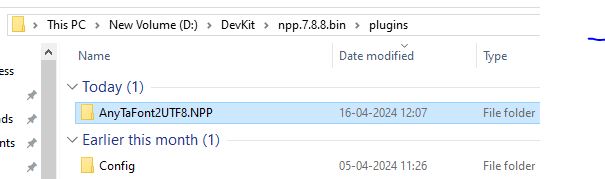
7. Files Structure
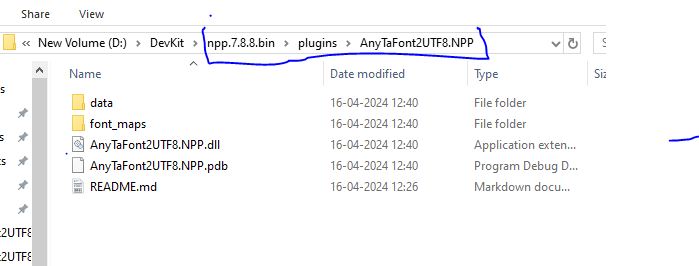
8. How to use the Plugin at Notepad++
-
Download Notepad++ from https://notepad-plus-plus.org/downloads/v8.6.5/
-
Download latest AnyTaFont2UTF8 from https://codeload.github.com/ThaniThamizhAkarathiKalanjiyam/AnyTaFont2UTF8/zip/refs/heads/master
-
Extract AnyTaFont2UTF8-master.zip; It created new folder called AnyTaFont2UTF8-master
-
Extract npp.8.6.5.portable.x64.zip; It creates new folder called npp.8.6.5.portable.x64; Go inside the folder there is a file called Notepad++.exe; Click it
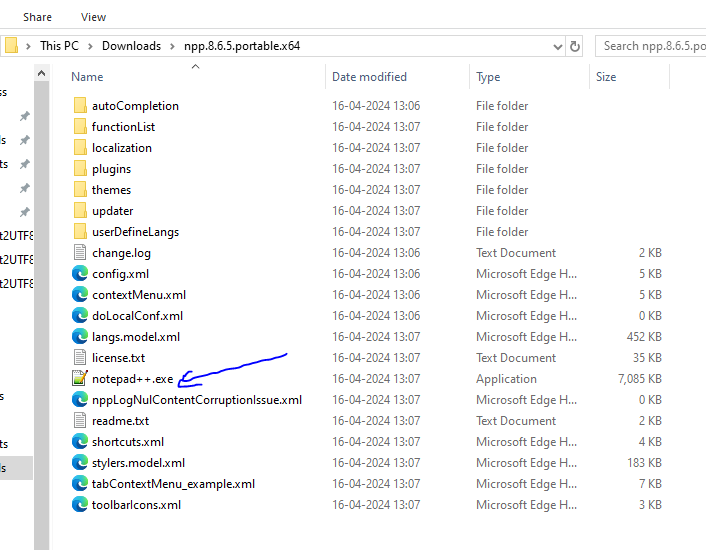
- Click plugins menu, then click open Plugin Folder
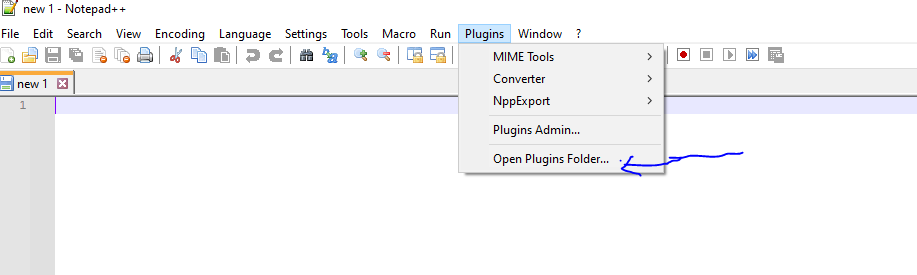
-
Copy After AnyTaFont2UTF8.NPP plugin folder to this folder
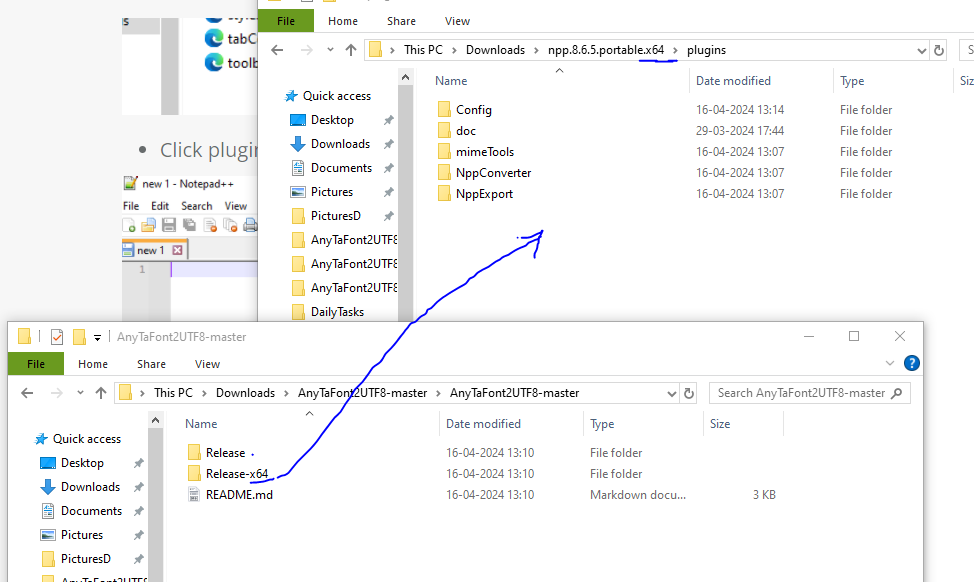
-
After copied the plugin folder seems as below
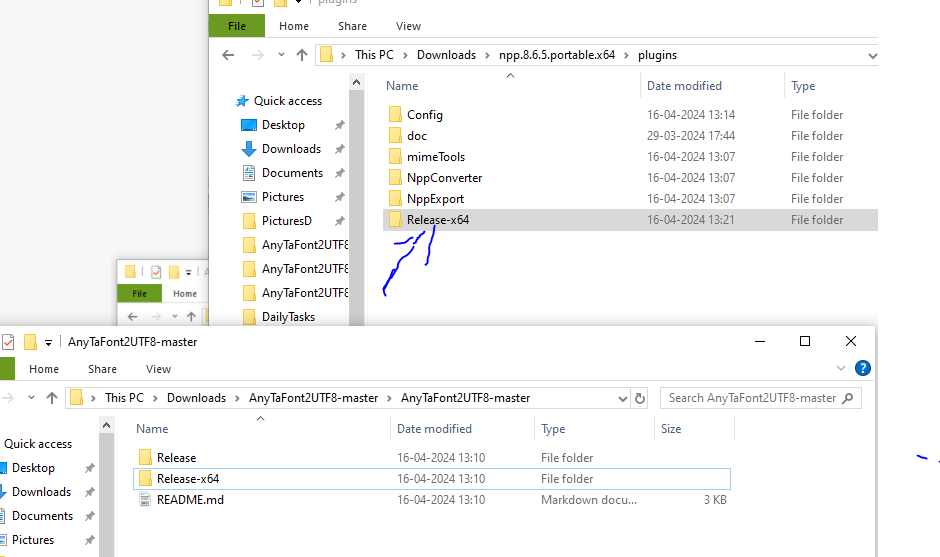
-
Rename folder Name Release-x64 to AnyTaFont2UTF8 within plugin folder
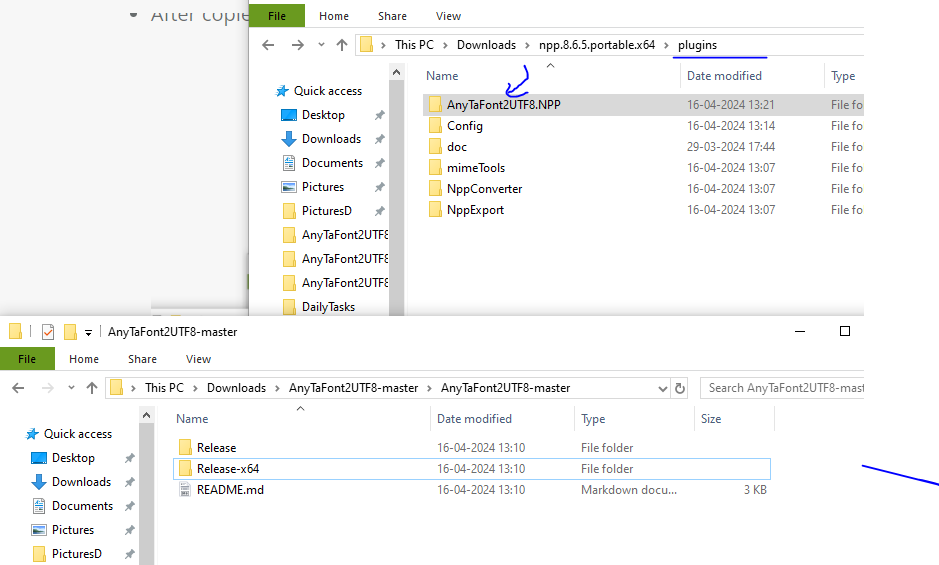
-
Now close Notepad++; then reopen
-
Now you can see AnyTaFont2UTF8 menu under plugins menu
9. Word / PDF content to UTF8
-
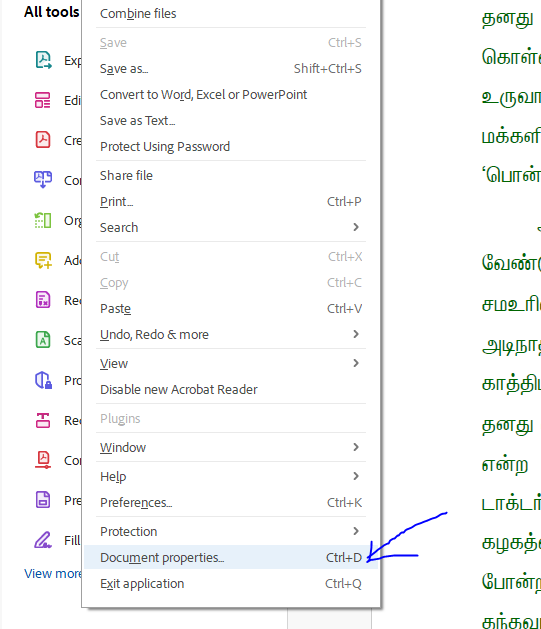
Now i consider i have a pdf; the text are in the Vanavil Format; Open PDF at Adobe Reader; Then click Document Properties from File menu
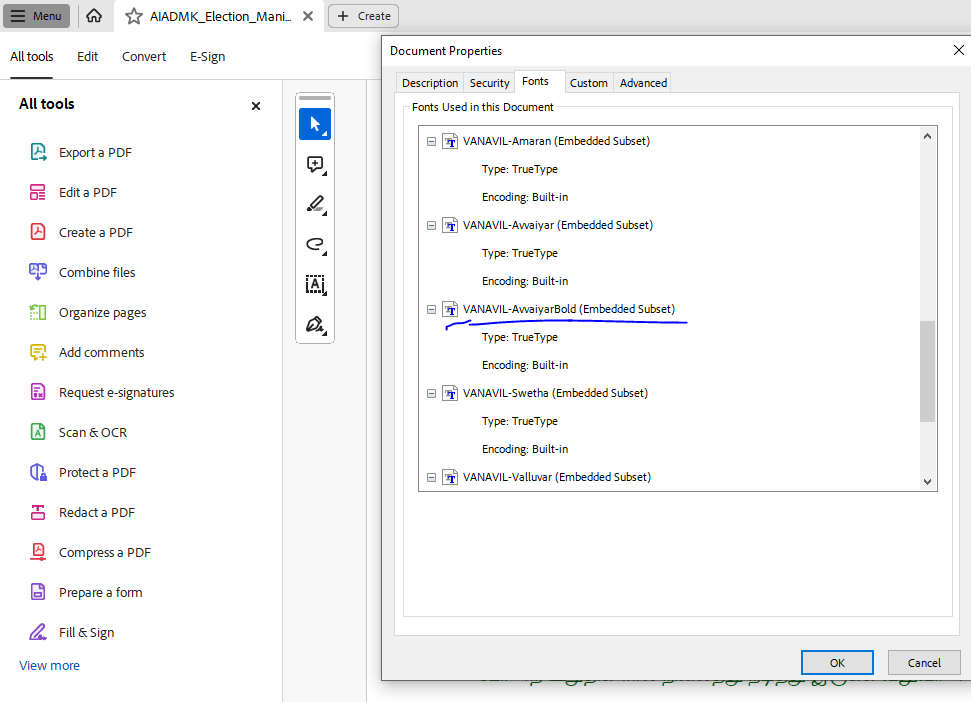
Go to Fonts tab as below
-
In the screen Vanavil font is available so i assumed text was created using Vanavil Font.
-
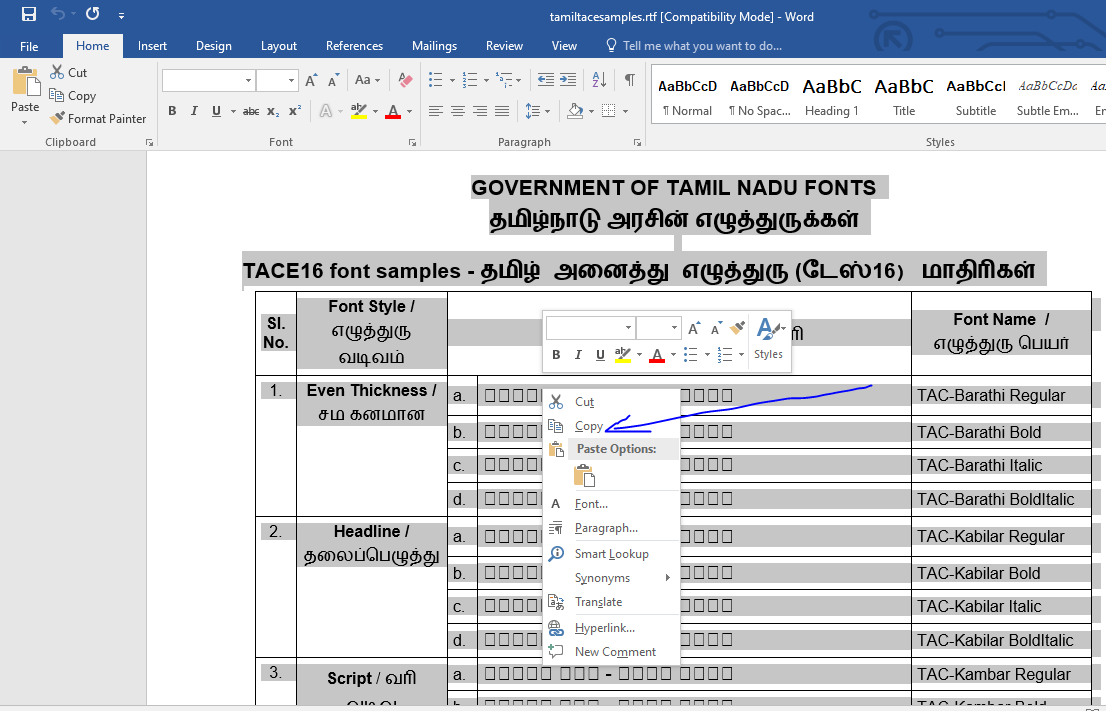
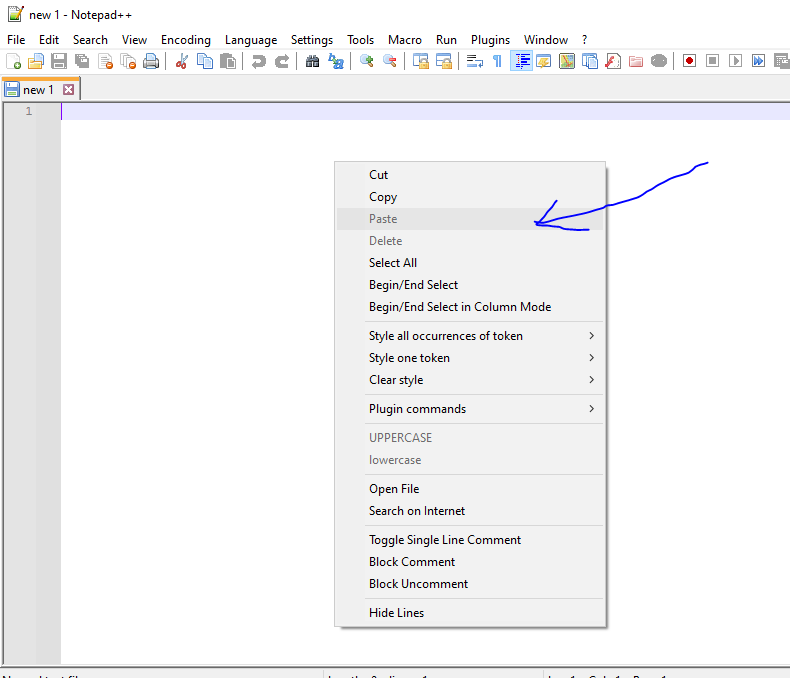
Then i select the Page Content from the needed page; like below copy the text and past it to Notepad++
-
For examble take this file tamiltacesamples.rtf i open it in word. and see the document some letters are not in correct font. So I try to copy as like below
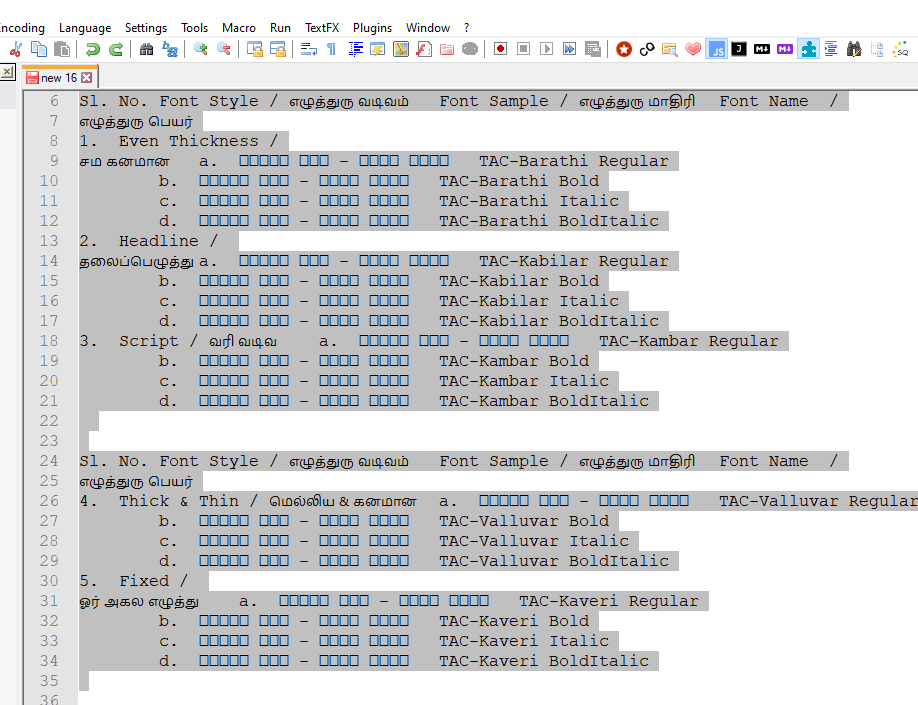
After past the text at Notepad++ it seems as below
-
-
After past the text seems as below
-
We already know the PDF text formated using Vanavil Font; So here I give command to our plugin convert Vanavil Font to UTF8.
-
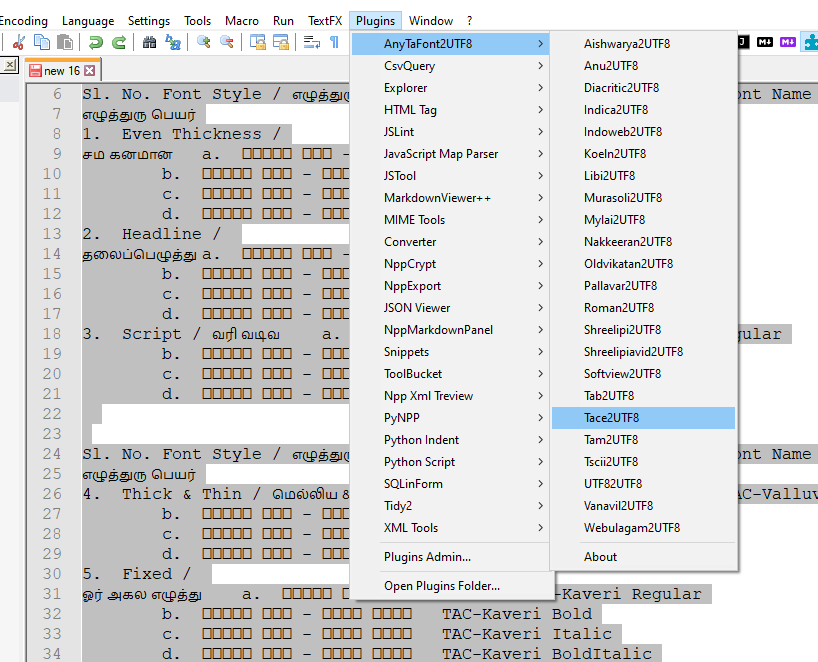
In our exable the Word document contains TACE encoding so i click Tace2UTF8 command from menu as above
-
-
ToDo the conversion Select Text then go to AnyTaFont2UTF8 plugin menu
-
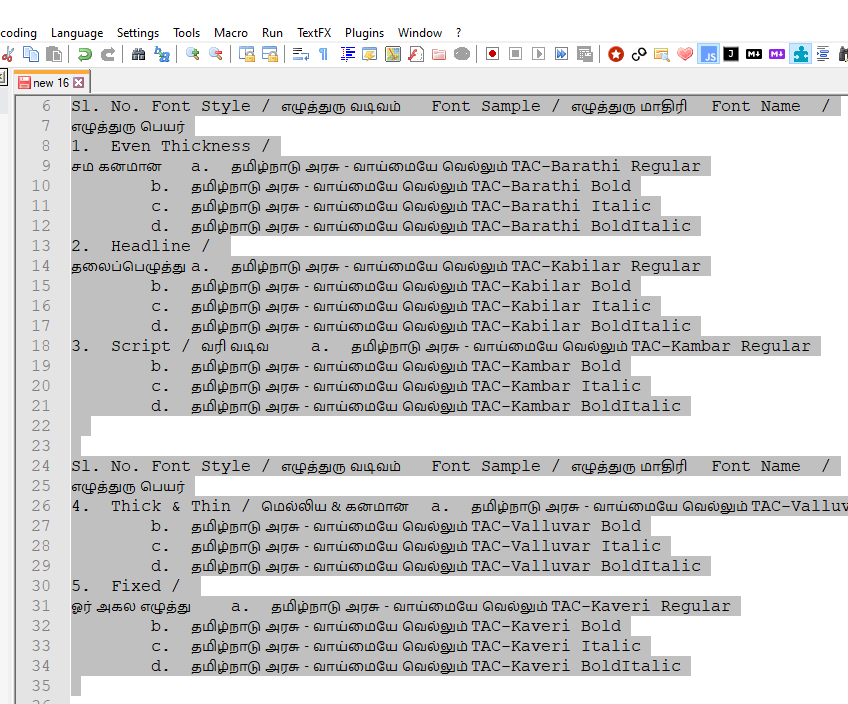
Our Plugin change the text to UTF8 encoding;
-
This is our Plugin magic; If you think this is worth means you can share this plugin link to Others.
10. What AnyTaFont2UTF8 plugin Does
| From Font Name | To Encoding Type |
|---|---|
| Aishwarya | UTF8 |
| Anu | UTF8 |
| Diacritic | UTF8 |
| Indica | UTF8 |
| Indoweb | UTF8 |
| Koeln | UTF8 |
| Libi | UTF8 |
| Murasoli | UTF8 |
| Mylai | UTF8 |
| Nakkeeran | UTF8 |
| Oldvikatan | UTF8 |
| Pallavar | UTF8 |
| Roman | UTF8 |
| Shreelipi | UTF8 |
| Shreelipiavid | UTF8 |
| Softview | UTF8 |
| Tab | UTF8 |
| Tace | UTF8 |
| Tam | UTF8 |
| Tscii | UTF8 |
| UTF8 | |
| Vanavil | UTF8 |
| Webulagam | UTF8 |
11. License
AnyTaFont2UTF8 Plugin for Notepad++ © 2009-2024 by Pitchaimuthu M is licensed under Creative Commons Attribution-ShareAlike 4.0 International. To view a copy of this license, visit https://creativecommons.org/licenses/by-sa/4.0/
You are free to:
- Share — copy and redistribute the material in any medium or format for any purpose, even commercially.
- Adapt — remix, transform, and build upon the material for any purpose, even commercially.
- The licensor cannot revoke these freedoms as long as you follow the license terms.
Under the following terms:
- Attribution — You must give appropriate credit , provide a link to the license, and indicate if changes were made . You may do so in any reasonable manner, but not in any way that suggests the licensor endorses you or your use.
- No additional restrictions — You may not apply legal terms or technological measures that legally restrict others from doing anything the license permits.
Notices:
You do not have to comply with the license for elements of the material in the public domain or where your use is permitted by an applicable exception or limitation .
No warranties are given. The license may not give you all of the permissions necessary for your intended use. For example, other rights such as publicity, privacy, or moral rights may limit how you use the material.